
Most Framer SEO guides focus on meta titles, sitemaps, and schema markup. Those things matter. But there is a technical problem hiding inside almost every Framer site that nobody talks about — and it is quietly draining rankings from sites that look perfectly optimised on the surface. The problem is component variants. If you are using them in Framer, and most designers are, your SEO may be taking damage you cannot see in the editor, the preview, or even a standard site audit.
What Are Component Variants in Framer?
Component variants are one of Framer's most useful design features. They let you create a single component — a card, a pricing block, a testimonial — and define multiple states or versions of it: a hover state, a dark mode version, a mobile layout, an active state.
In the editor it looks clean. One component, multiple variants, all managed in one place.
The problem is what happens when Framer publishes that component to the live page.
⎯⎯⎯⎯⎯⎯⎯⎯⎯⎯⎯⎯⎯⎯⎯⎯⎯⎯⎯⎯
What Component Variants Actually Do to Your DOM
When Framer publishes a page with component variants, every variant gets rendered into the DOM. Not just the one that is visible to the user. All of them.
They are hidden with CSS — display none, visibility hidden, opacity zero — so visitors typically only see the one intended variant. But hidden from humans does not mean hidden from search engines.
Google's crawler reads the DOM. It does not render your page the way a human does. It reads the raw HTML. And in that raw HTML, it finds the same content repeated as many times as you have variants.
A card component with four variants means Google sees four versions of that card's text, heading, and link on the same page. It does not know which one is the real one. So it does one of two things: it picks what it thinks is the primary version and discounts the rest, or it flags the repetition as a content quality issue and reduces the page's overall authority.
Either way, your rankings take a quiet hit.
⎯⎯⎯⎯⎯⎯⎯⎯⎯⎯⎯⎯⎯⎯⎯⎯⎯⎯⎯⎯
Why This Is Harder to Spot Than Other SEO Problems
Most SEO issues are visible if you know where to look. A missing meta title shows up in Search Console. A broken link triggers a crawl error. Thin content is obvious when you read the page.
Component variant duplication is different. The page looks correct in the Framer editor. The preview looks correct. A basic site audit looks correct. Even a manual inspection of the visible page looks correct.
The only way to see the problem is to inspect the raw DOM — open browser developer tools, look at the full HTML, and count how many times the same content appears. Most Framer site owners never do this. Most SEO audits skip it entirely.
That is exactly why it keeps causing damage without anyone noticing until rankings drop and there is no obvious explanation why.
⎯⎯⎯⎯⎯⎯⎯⎯⎯⎯⎯⎯⎯⎯⎯⎯⎯⎯⎯⎯
The Broader Framer SEO Picture
Component variants are the hidden issue, but they sit inside a broader set of Framer SEO fundamentals that all need to be in place for a site to rank well.
Metadata and page structure. Every page needs a unique meta title and meta description mapped through Framer's page settings or CMS fields. Framer defaults to using page titles for everything, which means without manual configuration every page on your site competes with itself in search results.
Heading hierarchy. Each page should have exactly one H1 that matches the primary search intent of that page. H2 and H3 headings should structure the content clearly so both crawlers and readers can follow the logic of the page.
Internal linking. Framer sites often launch with strong visual design and almost no internal link structure. Search engines use internal links to understand what your site is about and which pages carry the most authority. Without them, your pages rank in isolation instead of supporting each other.
Schema markup. Framer does not generate structured data automatically. JSON-LD schema for your organisation, your pages, your blog posts, and your FAQs needs to be added manually via custom code. Without it, you are invisible in rich results and significantly harder for AI tools to understand and cite.
Image alt text. Framer optimises image formats automatically, but descriptive alt text needs to be added manually to every image. Alt text is both an accessibility requirement and an SEO signal that tells crawlers what your images represent.
Page speed. Framer publishes to a global CDN and handles most performance fundamentals out of the box, but heavy hero animations, large uncompressed source images, and unnecessary third-party scripts can still drag Core Web Vitals scores down and affect rankings.
⎯⎯⎯⎯⎯⎯⎯⎯⎯⎯⎯⎯⎯⎯⎯⎯⎯⎯⎯⎯
Framer SEO and AEO: What AI Tools Need From Your Site
Traditional SEO gets you ranked in Google. AEO — Answer Engine Optimisation — gets you cited by AI tools like ChatGPT, Claude, and Perplexity when someone asks a question your site should be answering.
The difference matters now. AI-driven search is growing. A significant share of queries never reach a traditional search results page anymore. They get answered directly by an AI tool that pulls from sources it has already evaluated and indexed. If your Framer site is not structured for AI readability, you are invisible to that entire channel.
What AI tools look for is different from what Google prioritises.
They need clear entity signals. Your site should make it immediately obvious who you are, what you do, and who you serve. Organisation schema, a clear About page, and consistent NAP data across the site all contribute to this.
They need concise answer blocks. Content that answers a specific question in two to four sentences is far more likely to be cited than a long paragraph that buries the answer. Structuring your content around questions your audience actually asks — and answering them directly — is the most reliable way to earn AI citations.
They need topical authority. A site that covers one subject in depth, with multiple interconnected pages all pointing toward the same expertise, signals to AI tools that it is a reliable source on that topic. A collection of loosely related pages does not.
They need clean structured data. FAQPage schema, Article schema, and Organisation schema all give AI tools machine-readable signals about what your content contains and whether it is trustworthy.
⎯⎯⎯⎯⎯⎯⎯⎯⎯⎯⎯⎯⎯⎯⎯⎯⎯⎯⎯⎯
Starting Clean: How Free Framer Templates Help
One of the easiest ways to avoid these problems is to start with a template that is built with clean structure from the beginning.
The free Framer templates at damircosic.com are built with semantic heading hierarchy, clear page structure, and content architecture designed around how both visitors and crawlers read a page. They are not a substitute for a proper SEO setup, but they give you a significantly cleaner foundation than a blank canvas or a generic template that was built purely for visual appeal.
If you are launching a SaaS product, Solveo and Veilux give you a structured starting point. If you are building for AI tools or automation, Automateo, Synthflows, and Clarion are built specifically for those use cases. Fitframe and Eunoia cover fitness and wellness. Growthcraft is built for consultants and advisors. Strays is designed for nonprofits and charities.
All of them are free. Browse the full collection at damircosic.com/templates.
⎯⎯⎯⎯⎯⎯⎯⎯⎯⎯⎯⎯⎯⎯⎯⎯⎯⎯⎯⎯
What to Do If Your Site Already Has This Problem
If your Framer site is already live and you are using component variants heavily, the fix is not straightforward. It is not a settings change or a plugin install. The affected components need to be audited, restructured, and in many cases rebuilt to eliminate the DOM duplication without breaking the design.
That process also tends to surface other technical SEO issues — missing schema, weak internal linking, metadata gaps — that are worth fixing at the same time.
If you want your Framer site audited and fixed properly, that is exactly what I offer as a service. Start at damircosic.com/services.
⎯⎯⎯⎯⎯⎯⎯⎯⎯⎯⎯⎯⎯⎯⎯⎯⎯⎯⎯⎯
Frequently Asked Questions
Do Framer component variants always cause SEO problems?
Not always, but frequently. The risk is highest when variants contain unique text content, headings, or links that get duplicated across multiple versions of the same component. Purely visual variants — colour changes, spacing adjustments — are lower risk. If in doubt, inspect your DOM.
Can I fix component variant SEO issues myself?
Yes, if you are comfortable working inside Framer and understand the DOM implications. The general approach is to reduce the number of content-bearing variants and use CSS or interactions to handle visual states rather than duplicating content across multiple rendered variants.
Does Framer generate schema markup automatically?
No. Framer handles technical SEO fundamentals like sitemaps, clean URLs, and metadata controls. Structured data including Organisation schema, FAQPage schema, and Article schema needs to be added manually via custom code in your page or site settings.
How does AEO differ from traditional SEO for Framer sites?
Traditional SEO focuses on ranking in Google's search results pages. AEO focuses on being cited by AI tools like ChatGPT and Perplexity when they answer questions. AEO requires structured data, clear entity signals, concise answer-formatted content, and topical authority — none of which Framer provides automatically.
How do I know if my Framer site has component variant duplication?
Open your live site in a browser, right-click, and select Inspect or View Page Source. Search for text that appears in your components. If you see the same heading or body text appearing multiple times in the HTML when it only appears once visually on the page, you have variant duplication.
Are the free Framer templates at damircosic.com SEO optimised?
They are built with clean semantic structure and correct heading hierarchy, which gives you a strong foundation. Full SEO optimisation — metadata, schema, internal linking, content strategy — still needs to be implemented for each specific site. The templates remove the structural problems so you can focus on the content and configuration.
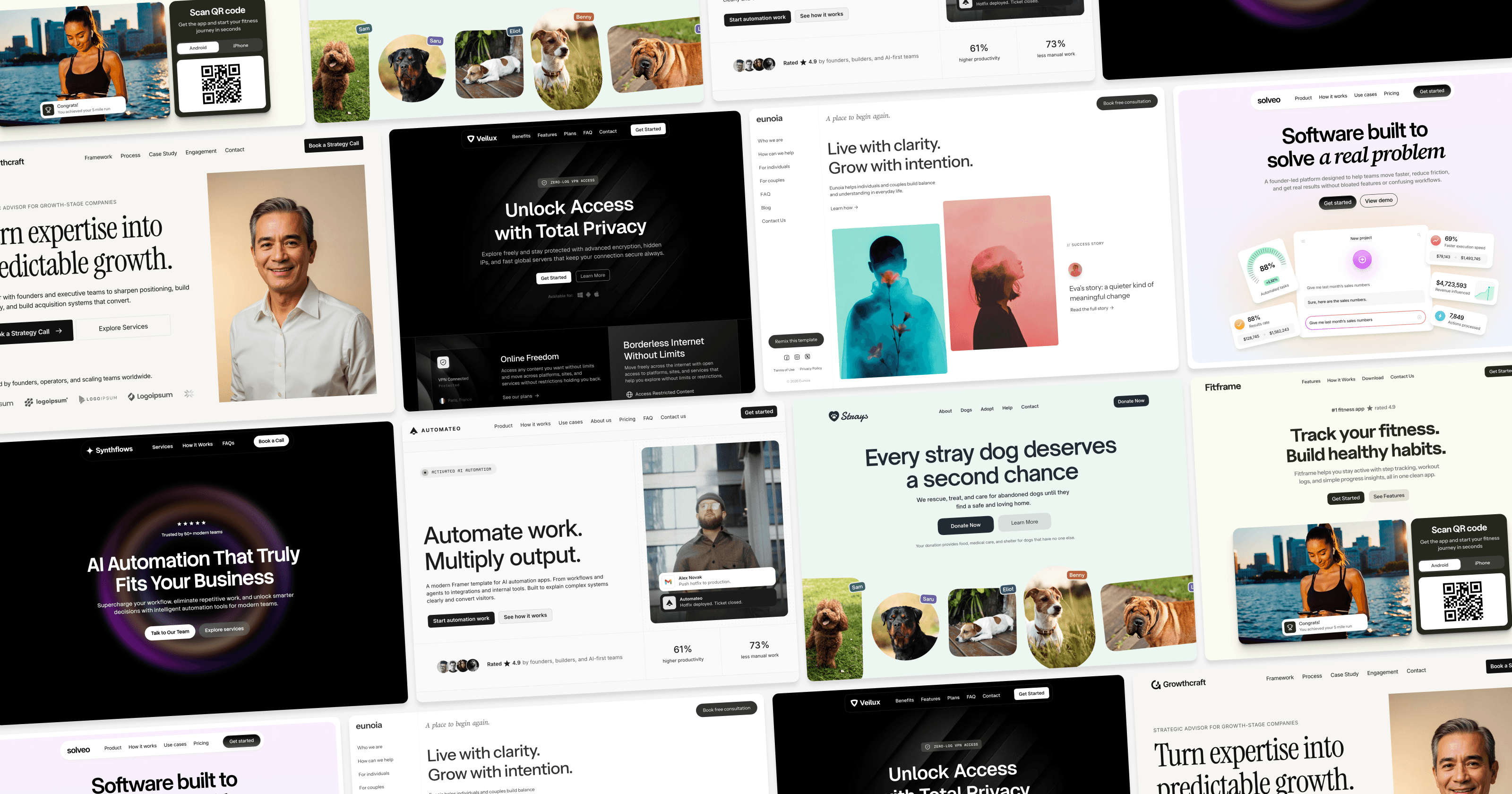
Browse Free Framer Templates
Browse all free templates SaaS templates AI templates Fitness templates Nonprofit templates